
Step 1: Contact Your 401(k) Plan Administrator
Reach out to your previous 401(k) plan administrator and request a direct rollover into your Altruist IRA.
Important: The rollover check must be made payable to:
“Altruist Financial LLC FBO [Your Full Name]”
(FBO stands for “For Benefit Of”)
Example: Altruist Financial LLC FBO John Doe
What if the check is made payable to you instead?
If the plan administrator mails the check to you directly (called an indirect rollover), that's still acceptable as long as:
-
No taxes are withheld from the check.
-
The check is still made payable to: "Altruist Financial LLC FBO [Your Full Name]."
If taxes are withheld, you may face additional tax consequences, so it's best to request a direct rollover whenever possible.
Step 2: Deposit the Check into Altruist
Once you receive the rollover check, follow these steps:
-
-
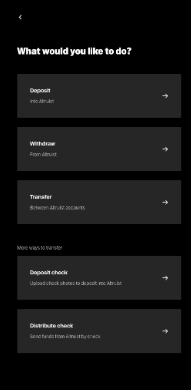
Navigate to the Transfers section.
-
Select Deposit Check.
-
Select the correct account, Contribution Reason and Contribution Year. If you are unsure, please reach out to us!
-
Enter the deposit amount.
-
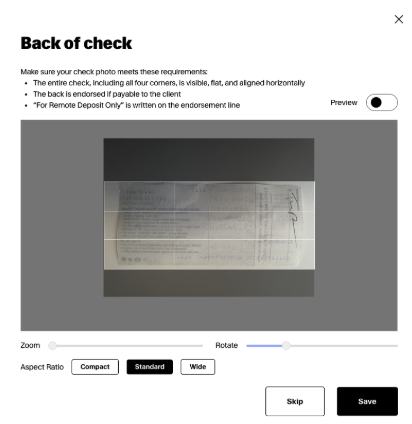
Upload the front and back images of the signed check — drag and drop or browse from your computer. Altruist accepts JPEG and PNG files.
-
Use the built-in tools to zoom, rotate, or crop the images to ensure the full check is clearly visible. Use the Preview toggle to see how the image will look before submitting it.
-
Review your deposit details on the confirmation screen.
-
Click Submit.
Need Help?
We’re here to make this process as simple as possible. If you have any questions or would like someone to walk you through it, please reach out to us at help@advisor.com
Processing times may vary based on your previous plan administrator. Once Altruist receives and deposits the check, you’ll be able to view it in your account dashboard.